Funds Transfer or Custom PayRecs International Right
Last updated: April 28, 2026
Depending on your configuration and online banking version, you may have access to 2 types of transaction rights that PayRecs will use to facilitate transactions. PayRecs supports using both in order to debit funds from your customers account into the Settlement account at the time of the transaction.
Funds Transfer
Funds transfer is the most common and likely method that is already enable for most customers.
PayRecs International Transaction Right
“PayRecs International” is a custom transaction type in Q2 (may be referred to as "GT Flavor") that lets PayRecs pre-fund customer transactions automatically—without being subject to any Funds Transfer rules, policies or limits.
What is the purpose?
Previously, financial institutions had to remove certain Funds Transfer limits, rules, or policies to make PayRecs work. This new transaction type operates independently, eliminating that need.
Which method is best?
If supported, we recommend the PayRecs International Transaction type. Review the Enrollment instructions if you're interested
Setup
Whichever method you want your customer to use, ensure that the following are set for both company and user level. Funds Transfer is used below in the screenshots, but the PayRecs International works the same way.
While the instructions below are loosening the controls of the Q2 transfer right, limits, dual control, and authorization token/MFA settings are still managed separately through the PayRecs admin panel.
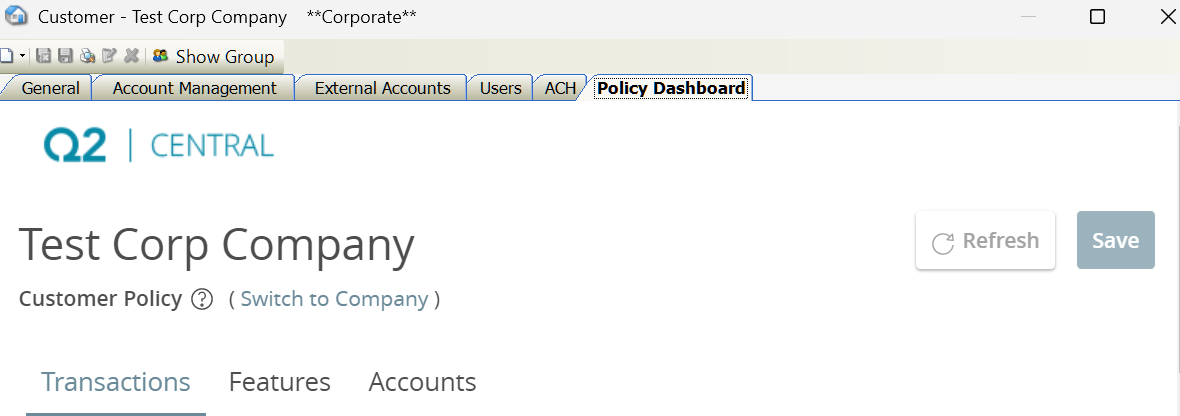
To start reviewing and configuring the transaction right, navigate to the Policy Dashboard/Transactions Tab.
If the customer in is not using Policy, the instructions are similar, but you'll be looking for the transaction right under the "Rights" tab

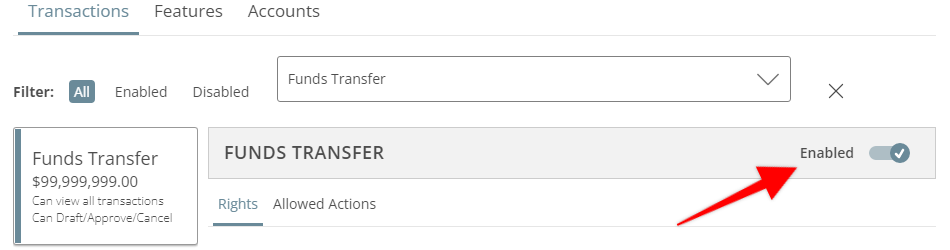
Enabled
Make sure that the enabled toggle is on
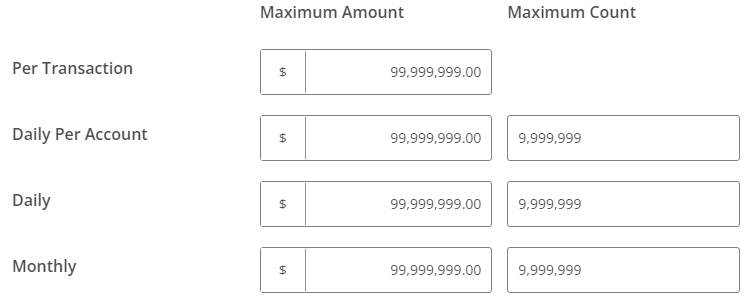
Limits
Ensure that the limits are not lower than that volume you want the customer to have access to for internation wires. Any limit set here cannot be exceed by a PayRecs Transaction
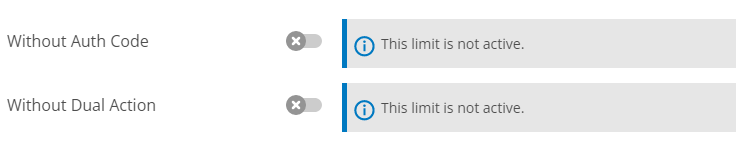
Auth Code and Dual Action
These must be disabled in order for the transaction to succeed.
Allowed Actions
Ideally no allowed actions are configured. While there are some conditions in which this may work, we recommend removing these completely.
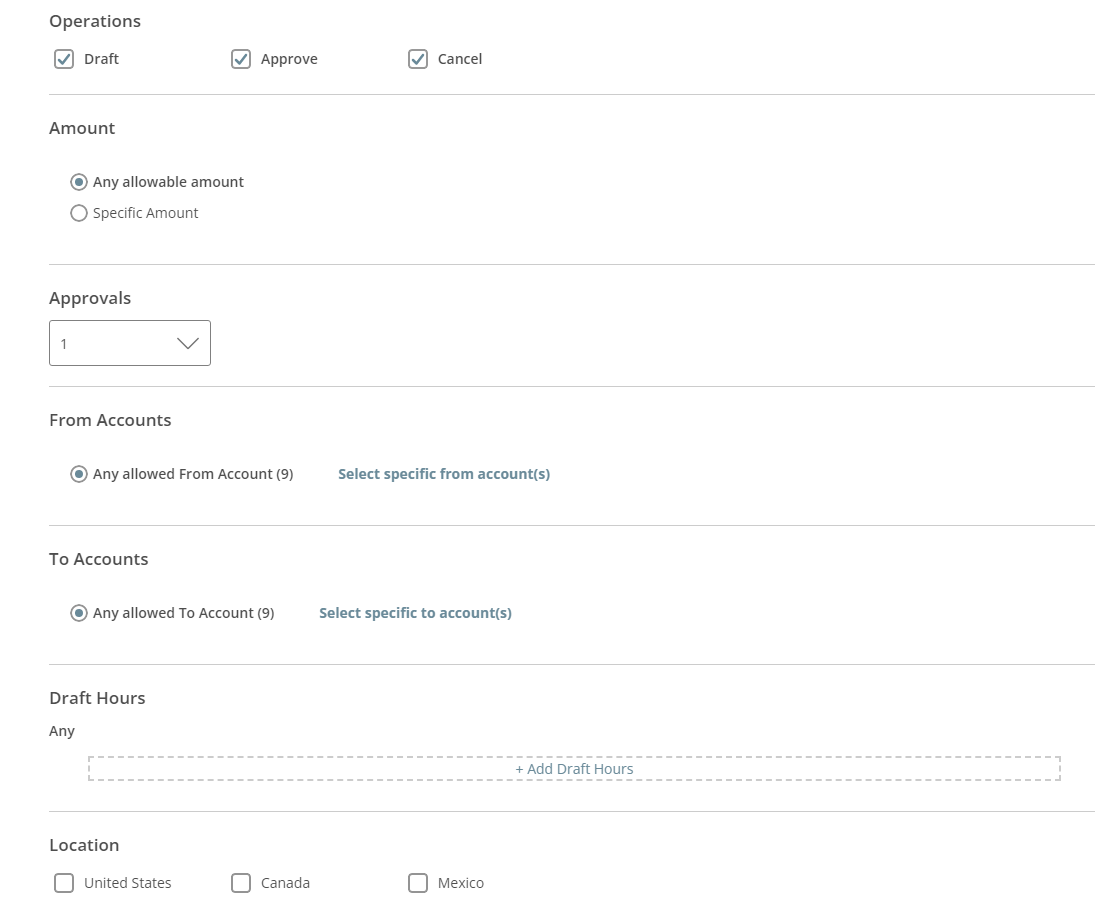
Operations: Draft, Approve must be enabled. Cancel should be enabled but isn't necessary
Amount: Any allowable amount
Approvals: Needs to be 1
From Accounts: This can be configured to restrict allowable accounts, but will cause confusion in the PayRecs UI. If an account is entitled to a user but not allowed for the transaction type, it will fail at execution attempt with an error
To Accounts: This must be "Any allowed To Account"
Draft Hours: This could be set, but will cause an error in PayRecs if the transaction is outside of the time.
Location: This could be set, but will cause an error in PayRecs if online banking determines that the transaction was initiated outside of an allowed country.
Save your changes.
If you configured the PayRecs International Transaction right, you’re now free to adjust Funds Transfer to your needs, including dual, authentication, limits, policies/allowed actions.
Watch This:
A video walkthrough of the Q2 Central setup process is available here: Setup Video
PayRecs International Transaction Right Enrollment
Confirm Activation:
Verify with PayRecs that you want this functionality enabled in your environment.
Minimum Q2 versions required: HQ 4.6.0.7008 and DB 4.6.0.7015.
Once we receive your request, we’ll install it in the background with Q2.
Post-Installation:
We’ll reach out to schedule a brief review, enablement, and testing session.
Ideally, have someone with Central access and a pre-set test account in your production environment.
PTE Testing (Optional):
If you already have a PTE environment enabled, it’s a good opportunity to test.
If not, contact support to learn how to enable a PTE environment with PayRecs or discuss an isolate PROD test plan.
Q & A
Q: What does this look like in online banking?
A: It will appear the same as the legacy Funds Transfer method, including its passage to the core system.
Q: What if we have a tran code or other customizations for PayRecs?
A: These should not be affected.
Q: Why doesn’t this fix the tran code issue?
A: It’s a workaround to separate PayRecs transactions from Funds Transfer from a permissions standpoint. We’re working with Q2 to better represent these transactions as International Wire transfers in both Online Banking and the Core system.
Q: How much does this cost?
A: Nothing!
Q: What are the requirements?
A: Q2 must be at HQ version 4.6.0.7008 and DB version 4.6.0.7015. Most environments are supported unless they’re several cycles behind the latest updates.
Q: Does this need to be enabled on all groups/companies?
A: Not necessarily. If enabled for your institution but not rolled out to every group, the system will default to the old Funds Transfer method. Ideally, transition all users—especially corporate groups, where most conflicts occur.
Certain core and Q2 adapters can support custom tran code - please reach out to support@getpayrecs.com to see if your environment has this capability.